Hãy Ấn Nút Thích Vào Face Và twitter Để Mở Nội Dung Bị Khoá Tweet
4. Script sửa lỗi hình ảnh Vì khi 1 số demo khi làm hệ thống này thì sẽ bị lệch ảnh hay bị gì đó mình khuyên nên gắn cho lành để đảm bảo 100% an toàn cho người chơi
Bắt Đầu Nào :
Đầu tiên vào chúng ta tạo 1 Common Events trong Database ( Nhấn F9 sẽ thấy Database )
Mình sẽ sử dụng cái đầu tiên các bạn dùng cái nào thì tuỳ nhé
Thì Mình Đặt tên cái đó là Score System Ace và các mục kia làm như hình lun
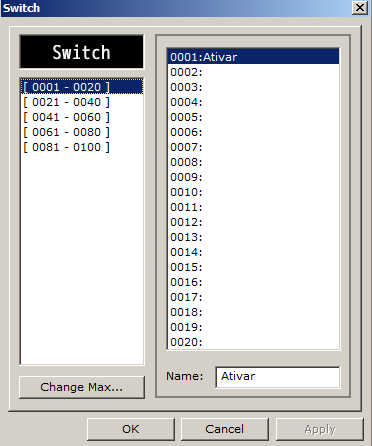
cái Condition Switch bạn chọn cái Switch hồi này trong phần yêu cầu làm á nhé
Và sau đó xuống dưới chúng ta tạo các lệnh trong đó ( trong phần Contents á )
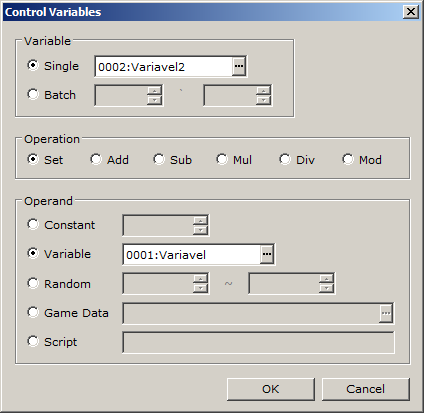
Đầu tiên bạn tạo 1 Control Variable như hình dưới
Chú ý chọn theo tên mà các bạn đặt cho Variable hồi nãy trong phần yêu cầu như trong hình nhé, đừng thấy trong hình chọn id nào là bạn chọn là sai nhé , hãy chọn theo tên của Variable như trong hình
vào tạo tiếp cái thứ 2 làm tương tự như vậy
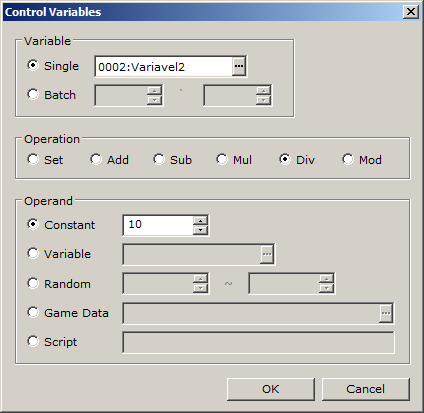
Constant bạn ghi 100 nhé và Phần Operation chọn Div
Tạo thêm 1 cái thứ 3 nữa làm giống vậy lun
Constant ghi 10 và Phần Operation chọn Mod
Và cái thứ 4
Nhớ làm theo hình nha :V chứ cái này nhiều làm mình cũng viết mỏi tay r chụp cho các bạn làm theo thui
và mấy cái khác :3
Sau khi xong hết hãy xem lại nó có đủ như hình dưới ko
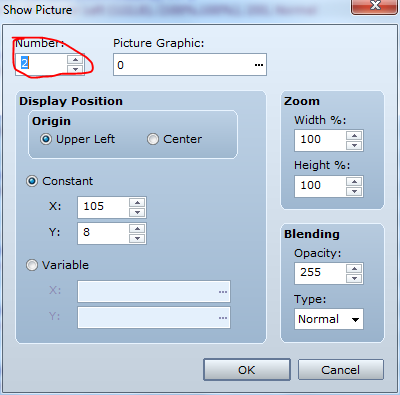
Tiếp theo chúng ta tiếp tục lần này chúng ta tạo lệnh Show Picture
và chọn như hình
cái chỗ Picture Graphic á ae chọn cái file score trên phần yêu cầu tải về nhá
và tạo tiếp 1 lệnh Wait là 1 Frames
Tiếp theo chúng ta tạo thêm 1 lệnh khác nữa là Conditional Branch và thiết lập như hình dưới
Cũng chọn Variable theo tên trong hình
và bên trong Conditional Branch
thêm lệnh Show Picture và thiết lập như hình dưới
nhớ chỗ Number là 4
cái chỗ Picture Graphic á ae chọn cái file score trên phần yêu cầu tải về nhá
Và những cái sao tương tự chỉ thay đổi Conditional Branch cái chỗ Constant bạn làm từ 0 đến 9 ở trên mình làm mẫu 0 rồi nên nếu các bạn đã làm 0 rồi thì giờ làm từ 1 đến 9
và lệnh Show Picture trong mỗi cái Conditional Branch cũng vậy thay đổi Picture Graphic chọn file tên từ 0-9 ở trên đã làm 0 rồi giờ bạn làm thêm từ 1-9 ( chú ý sau khi làm phải đếm đủ 10 cái này nhé )
chỗ Number vẫn ghi 4 hết nhé
sau khi xong chúng ta sẽ có nguyên dàn như hình dưới
Và sau khi xong phần này các bạn thêm 1 lệnh Wait là 1
sau đó tạo thêm lệnh Conditional Branch và Show Picture làm như trên từ 0-9 nhưng thay đổi chỗ Variable là Dezena và Chỗ Number Của Show Picture là 3 như 2 hình dưới ( chú ý sau khi làm phải đếm đủ 10 cái này nhé )
tiếp theo tạo thêm 1 lệnh Wait là 1
và sau đó tạo thêm lệnh Conditional Branch và Show Picture làm như trên từ 0-9 nhưng thay đổi chỗ Variable là Centena và Chỗ Number của Show Picture là 2 như 2 hình dưới ( chú ý sau khi làm phải đếm đủ 10 cái này nhé )
sau khi xong thêm lệnh wait là 1
vậy là xong phần thiết lập thủ công cho hệ thống giờ lưu lại
Phần Kích Hoạt Và sử dụng hệ thống
Khi vào game hệ thống ko thể tự động chạy đc nên chúng ta dùng lệnh Control Switches chọn cái Switch mà hỗi nãy trong yêu cầu đặt tên là Ativar và để chế độ ON để bật nó lên như hình
và bạn mún mỗi lần làm j đó cộng điểm thì chỉ cần tăng Variable tên Variavel ( tên này mình đã kêu đặt trên phần yêu cầu đó nhé ) lên là xong vì Variable tên Variavel đc thiết lập là dữ liệu điểm của nhân vật
nếu các bạn nào ko biết tăng thì mình chỉ lun
các bạn vào Control Variable
Single bạn chọn Variavel (
trong đó add là cộng vào
chỗ constant là số điểm mún cộng vào
Vậy là xong nếu các bạn có thắc mắc gì xin comment phía dưới và liên hệ Admin
Script Yanfly Engine Ace - System Options v1.00 ( Yêu Cầu Phải Có )
Những Dòng Nào mình tô màu đỏ là các bạn có thể việt hoá lại còn màu xanh thì để nguyên hoặc việt hoá lại cũng đc tuỳ ý
#==============================================================================
#
# ▼ Yanfly Engine Ace - System Options v1.00
# -- Last Updated: 2012.01.01
# -- Level: Normal
# -- Requires: n/a
#
#==============================================================================
$imported = {} if $imported.nil?
$imported["YEA-SystemOptions"] = true
#==============================================================================
# ▼ Updates
# =-=-=-=-=-=-=-=-=-=-=-=-=-=-=-=-=-=-=-=-=-=-=-=-=-=-=-=-=-=-=-=-=-=-=-=-=-=-=
# 2012.01.01 - Started Script and Finished.
#
#==============================================================================
# ▼ Introduction
# =-=-=-=-=-=-=-=-=-=-=-=-=-=-=-=-=-=-=-=-=-=-=-=-=-=-=-=-=-=-=-=-=-=-=-=-=-=-=
# This script replaces the "Game End" option in the Main Menu with a "System"
# menu where the player can adjust various settings in the game. Of them, the
# player can change the window colour, the volume for BGM, BGS, SFX, set
# automatic dashing, message text to display instantly, and speed up battles by
# hiding battle animations.
#
#==============================================================================
# ▼ Instructions
# =-=-=-=-=-=-=-=-=-=-=-=-=-=-=-=-=-=-=-=-=-=-=-=-=-=-=-=-=-=-=-=-=-=-=-=-=-=-=
# To install this script, open up your script editor and copy/paste this script
# to an open slot below ▼ Materials/素材 but above ▼ Main. Remember to save.
#
# -----------------------------------------------------------------------------
# Script Calls - These commands are used with script calls.
# -----------------------------------------------------------------------------
# $game_system.volume_change(:bgm, x)
# $game_system.volume_change(:bgs, x)
# $game_system.volume_change(:sfx, x)
# Unlike the previous Yanfly Engines, this version does not bind volume to a
# variable. Use the script call to change the bgm, bgs, or sfx sound rate by
# x increment. Use a negative value to lower the volume.
#
# $game_system.set_volume(:bgm, x)
# $game_system.set_volume(:bgs, x)
# $game_system.set_volume(:sfx, x)
# Use this script call to set the bgm, bgs, or sfx volume directly. (x should
# be between 0 and 100.)
#
# $game_system.set_autodash(true)
# $game_system.set_autodash(false)
# Turns autodash on (true) or off (false).
#
# $game_system.set_instantmsg(true)
# $game_system.set_instantmsg(false)
# Turns instant messages on (true) or off (false).
#
# $game_system.set_animations(true)
# $game_system.set_animations(false)
# Turns battle animations on (true) or off (false).
#
#==============================================================================
# ▼ Compatibility
# =-=-=-=-=-=-=-=-=-=-=-=-=-=-=-=-=-=-=-=-=-=-=-=-=-=-=-=-=-=-=-=-=-=-=-=-=-=-=
# This script is made strictly for RPG Maker VX Ace. It is highly unlikely that
# it will run with RPG Maker VX without adjusting.
#
#==============================================================================
module YEA
module SYSTEM
#=-=-=-=-=-=-=-=-=-=-=-=-=-=-=-=-=-=-=-=-=-=-=-=-=-=-=-=-=-=-=-=-=-=-=-=-=-
# - General Setting -
#=-=-=-=-=-=-=-=-=-=-=-=-=-=-=-=-=-=-=-=-=-=-=-=-=-=-=-=-=-=-=-=-=-=-=-=-=-
# These are the general settings that govern the System settings. This will
# change the "Game End" vocab, and disable or enable autodash, instant
# messages, or animations by default.
#=-=-=-=-=-=-=-=-=-=-=-=-=-=-=-=-=-=-=-=-=-=-=-=-=-=-=-=-=-=-=-=-=-=-=-=-=-
COMMAND_NAME = "System" # Command name used to replace Game End.
DEFAULT_AUTODASH = true # Enable automatic dashing by default?
DEFAULT_INSTANTMSG = false # Enable instant message text by default?
DEFAULT_ANIMATIONS = true # Enable battle animations by default?
#=-=-=-=-=-=-=-=-=-=-=-=-=-=-=-=-=-=-=-=-=-=-=-=-=-=-=-=-=-=-=-=-=-=-=-=-=-
# - Command Settings -
#=-=-=-=-=-=-=-=-=-=-=-=-=-=-=-=-=-=-=-=-=-=-=-=-=-=-=-=-=-=-=-=-=-=-=-=-=-
# These settings adjust the commands shown in the command list. Add, remove
# or rearrange the commands as you see fit. Here's a list of which commands
# do what:
#
# -------------------------------------------------------------------------
# :command Description
# -------------------------------------------------------------------------
# :blank Inserts an empty blank space.
#
# :window_red Changes the red tone for all windows.
# :window_grn Changes the green tone for all windows.
# :window_blu Changes the blue tone for all windows.
#
# :volume_bgm Changes the BGM volume used.
# :volume_bgs Changes the BGS volume used.
# :volume_sfx Changes the SFX volume used.
#
# :autodash Sets the player to automatically dash.
# :instantmsg Sets message text to appear instantly.
# :animations Enables battle animations or disables them.
#
# :to_title Returns to the title screen.
# :shutdown Shuts down the game.
#
#=-=-=-=-=-=-=-=-=-=-=-=-=-=-=-=-=-=-=-=-=-=-=-=-=-=-=-=-=-=-=-=-=-=-=-=-=-
COMMANDS =[
:window_red, # Changes the red tone for all windows.
:window_grn, # Changes the green tone for all windows.
:window_blu, # Changes the blue tone for all windows.
:volume_bgm, # Changes the BGM volume used.
:volume_bgs, # Changes the BGS volume used.
:volume_sfx, # Changes the SFX volume used.
:blank,
:autodash, # Sets the player to automatically dash.
:instantmsg, # Sets message text to appear instantly.
:animations, # Enables battle animations or disables them.
# :switch_1, # Custom Switch 1. Adjust settings below.
# :switch_2, # Custom Switch 2. Adjust settings below.
# :variable_1, # Custom Variable 1. Adjust settings below.
# :variable_2, # Custom Variable 2. Adjust settings below.
:blank,
:to_title, # Returns to the title screen.
:shutdown, # Shuts down the game.
] # Do not remove this.
#--------------------------------------------------------------------------
# - Custom Switches -
# - - - - - - - - - - - - - - - - - - - - - - - - - - - - - - - - - - - - -
# If you want your game to have system options other than just the ones
# listed above, you can insert custom switches here to produce such an
# effect. Adjust the settings here as you see fit.
#--------------------------------------------------------------------------
CUSTOM_SWITCHES ={
# -------------------------------------------------------------------------
# :switch => [Switch, Name, Off Text, On Text,
# Help Window Description
# ], # Do not remove this.
# -------------------------------------------------------------------------
:switch_1 => [ 1, "Custom Switch 1", "OFF", "ON",
"Help description used for custom switch 1."
],
# -------------------------------------------------------------------------
:switch_2 => [ 2, "Custom Switch 2", "OFF", "ON",
"Help description used for custom switch 2."
],
# -------------------------------------------------------------------------
} # Do not remove this.
#--------------------------------------------------------------------------
# - Custom Variables -
# - - - - - - - - - - - - - - - - - - - - - - - - - - - - - - - - - - - - -
# If you want your game to have system options other than just the ones
# listed above, you can insert custom variables here to produce such an
# effect. Adjust the settings here as you see fit.
#--------------------------------------------------------------------------
CUSTOM_VARIABLES ={
# -------------------------------------------------------------------------
# :variable => [Switch, Name, Colour1, Colour2, Min, Max,
# Help Window Description
# ], # Do not remove this.
# -------------------------------------------------------------------------
:variable_1 => [ 1, "Custom Variable 1", 9, 1, -100, 100,
"Help description used for custom variable 1."
],
# -------------------------------------------------------------------------
:variable_2 => [ 2, "Custom Variable 2", 10, 2, -10, 10,
"Help description used for custom variable 2."
],
# -------------------------------------------------------------------------
} # Do not remove this.
#=-=-=-=-=-=-=-=-=-=-=-=-=-=-=-=-=-=-=-=-=-=-=-=-=-=-=-=-=-=-=-=-=-=-=-=-=-
# - Vocab Settings -
#=-=-=-=-=-=-=-=-=-=-=-=-=-=-=-=-=-=-=-=-=-=-=-=-=-=-=-=-=-=-=-=-=-=-=-=-=-
# This hash adjusts the vocab used for both the commands and the help
# description that appears above the command window. Note that for the
# command help descriptions, you may use text codes. Use \n to linebreak.
#=-=-=-=-=-=-=-=-=-=-=-=-=-=-=-=-=-=-=-=-=-=-=-=-=-=-=-=-=-=-=-=-=-=-=-=-=-
COMMAND_VOCAB ={
# -------------------------------------------------------------------------
# :command => [Command Name, Option1, Option2
# Help Window Description,
# ], # Do not remove this.
# -------------------------------------------------------------------------
:blank => ["", "None", "None",
""
], # Do not remove this.
# -------------------------------------------------------------------------
:window_red => ["Window Red", "None", "None",
"Change the red colour tone for windows.\n" +
"Hold SHIFT to change increment by 10."
], # Do not remove this.
# -------------------------------------------------------------------------
:window_grn => ["Window Green", "None", "None",
"Change the green colour tone for windows.\n" +
"Hold SHIFT to change increment by 10."
], # Do not remove this.
# -------------------------------------------------------------------------
:window_blu => ["Window Blue", "None", "None",
"Change the blue colour tone for windows.\n" +
"Hold SHIFT to change increment by 10."
], # Do not remove this.
# -------------------------------------------------------------------------
:volume_bgm => ["BGM Volume", 12, 4, # Options 1 & 2 are Gauge Colours.
"Change the volume used for background music.\n" +
"Hold SHIFT to change increment by 10."
], # Do not remove this.
# -------------------------------------------------------------------------
:volume_bgs => ["BGS Volume", 13, 5, # Options 1 & 2 are Gauge Colours.
"Change the volume used for background sound.\n" +
"Hold SHIFT to change increment by 10."
], # Do not remove this.
# -------------------------------------------------------------------------
:volume_sfx => ["SFX Volume", 14, 6, # Options 1 & 2 are Gauge Colours.
"Change the volume used for sound effects.\n" +
"Hold SHIFT to change increment by 10."
], # Do not remove this.
# -------------------------------------------------------------------------
:autodash => ["Auto-Dash", "Walk", "Dash",
"Automatically dash without holding the run button."
], # Do not remove this.
# -------------------------------------------------------------------------
:instantmsg => ["Instant Text", "Normal", "Instant",
"Set message text to appear one-by-one or instantly."
], # Do not remove this.
# -------------------------------------------------------------------------
:animations => ["Battle Animations", "Hide", "Show",
"Hide animations during battle to speed up battles?"
], # Do not remove this.
# -------------------------------------------------------------------------
:to_title => ["Return to Title Screen", "None", "None",
"Go back to the title screen."
], # Do not remove this.
# -------------------------------------------------------------------------
:shutdown => ["Shutdown Game", "None", "None",
"Turns off the game."
], # Do not remove this.
# -------------------------------------------------------------------------
} # Do not remove this.
end # SYSTEM
end # YEA
#==============================================================================
# ▼ Editting anything past this point may potentially result in causing
# computer damage, incontinence, explosion of user's head, coma, death, and/or
# halitosis so edit at your own risk.
#==============================================================================
#==============================================================================
# ■ Vocab
#==============================================================================
module Vocab
#--------------------------------------------------------------------------
# overwrite method: self.game_end
#--------------------------------------------------------------------------
def self.game_end
return YEA::SYSTEM::COMMAND_NAME
end
end # Vocab
#==============================================================================
# ■ RPG::BGM
#==============================================================================
class RPG::BGM < RPG::AudioFile
#--------------------------------------------------------------------------
# overwrite method: play
#--------------------------------------------------------------------------
def play(pos = 0)
if @name.empty?
Audio.bgm_stop
@@last = RPG::BGM.new
else
volume = @volume
volume *= $game_system.volume(:bgm) * 0.01 unless $game_system.nil?
Audio.bgm_play('Audio/BGM/' + @name, volume, @pitch, pos)
@@last = self.clone
end
end
end # RPG::BGM
#==============================================================================
# ■ RPG::ME
#==============================================================================
class RPG::ME < RPG::AudioFile
#--------------------------------------------------------------------------
# overwrite method: play
#--------------------------------------------------------------------------
def play
if @name.empty?
Audio.me_stop
else
volume = @volume
volume *= $game_system.volume(:bgm) * 0.01 unless $game_system.nil?
Audio.me_play('Audio/ME/' + @name, volume, @pitch)
end
end
end # RPG::ME
#==============================================================================
# ■ RPG::BGS
#==============================================================================
class RPG::BGS < RPG::AudioFile
#--------------------------------------------------------------------------
# overwrite method: play
#--------------------------------------------------------------------------
def play(pos = 0)
if @name.empty?
Audio.bgs_stop
@@last = RPG::BGS.new
else
volume = @volume
volume *= $game_system.volume(:bgs) * 0.01 unless $game_system.nil?
Audio.bgs_play('Audio/BGS/' + @name, volume, @pitch, pos)
@@last = self.clone
end
end
end # RPG::BGS
#==============================================================================
# ■ RPG::SE
#==============================================================================
class RPG::SE < RPG::AudioFile
#--------------------------------------------------------------------------
# overwrite method: play
#--------------------------------------------------------------------------
def play
unless @name.empty?
volume = @volume
volume *= $game_system.volume(:sfx) * 0.01 unless $game_system.nil?
Audio.se_play('Audio/SE/' + @name, volume, @pitch)
end
end
end # RPG::SE
#==============================================================================
# ■ Game_System
#==============================================================================
class Game_System
#--------------------------------------------------------------------------
# alias method: initialize
#--------------------------------------------------------------------------
alias game_system_initialize_so initialize
def initialize
game_system_initialize_so
init_volume_control
init_autodash
init_instantmsg
init_animations
end
#--------------------------------------------------------------------------
# new method: init_volume_control
#--------------------------------------------------------------------------
def init_volume_control
@volume = {}
@volume[:bgm] = 100
@volume[:bgs] = 100
@volume[:sfx] = 100
end
#--------------------------------------------------------------------------
# new method: volume
#--------------------------------------------------------------------------
def volume(type)
init_volume_control if @volume.nil?
return [[@volume[type], 0].max, 100].min
end
#--------------------------------------------------------------------------
# new method: set_volume
#--------------------------------------------------------------------------
def set_volume(type, value)
init_volume_control if @volume.nil?
@volume[type] = [[value, 0].max, 100].min
case type
when :bgm
RPG::BGM::last.play
when :bgs
RPG::BGS::last.play
end
end
#--------------------------------------------------------------------------
# new method: volume_change
#--------------------------------------------------------------------------
def volume_change(type, increment)
set_volume(type, @volume[type] + increment)
end
#--------------------------------------------------------------------------
# new method: init_autodash
#--------------------------------------------------------------------------
def init_autodash
@autodash = YEA::SYSTEM::DEFAULT_AUTODASH
end
#--------------------------------------------------------------------------
# new method: autodash?
#--------------------------------------------------------------------------
def autodash?
init_autodash if @autodash.nil?
return @autodash
end
#--------------------------------------------------------------------------
# new method: set_autodash
#--------------------------------------------------------------------------
def set_autodash(value)
@autodash = value
end
#--------------------------------------------------------------------------
# new method: init_instantmsg
#--------------------------------------------------------------------------
def init_instantmsg
@instantmsg = YEA::SYSTEM::DEFAULT_INSTANTMSG
end
#--------------------------------------------------------------------------
# new method: instantmsg?
#--------------------------------------------------------------------------
def instantmsg?
init_instantmsg if @instantmsg.nil?
return @instantmsg
end
#--------------------------------------------------------------------------
# new method: set_instantmsg
#--------------------------------------------------------------------------
def set_instantmsg(value)
@instantmsg = value
end
#--------------------------------------------------------------------------
# new method: init_animations
#--------------------------------------------------------------------------
def init_animations
@animations = YEA::SYSTEM::DEFAULT_ANIMATIONS
end
#--------------------------------------------------------------------------
# new method: animations?
#--------------------------------------------------------------------------
def animations?
init_animations if @animations.nil?
return @animations
end
#--------------------------------------------------------------------------
# new method: set_animations
#--------------------------------------------------------------------------
def set_animations(value)
@animations = value
end
end # Game_System
#==============================================================================
# ■ Game_Player
#==============================================================================
class Game_Player < Game_Character
#--------------------------------------------------------------------------
# alias method: dash?
#--------------------------------------------------------------------------
alias game_player_dash_so dash?
def dash?
if $game_system.autodash?
return false if @move_route_forcing
return false if $game_map.disable_dash?
return false if vehicle
return !Input.press?(:A)
else
return game_player_dash_so
end
end
end # Game_Player
#==============================================================================
# ■ Scene_Battle
#==============================================================================
class Scene_Battle < Scene_Base
#--------------------------------------------------------------------------
# alias method: show_fast?
#--------------------------------------------------------------------------
alias scene_battle_show_fast_so show_fast?
def show_fast?
return true unless $game_system.animations?
return scene_battle_show_fast_so
end
#--------------------------------------------------------------------------
# alias method: show_normal_animation
#--------------------------------------------------------------------------
alias scene_battle_show_normal_animation_so show_normal_animation
def show_normal_animation(targets, animation_id, mirror = false)
return unless $game_system.animations?
scene_battle_show_normal_animation_so(targets, animation_id, mirror)
end
end # Scene_Battle
#==============================================================================
# ■ Window_Message
#==============================================================================
class Window_Message < Window_Base
#--------------------------------------------------------------------------
# alias method: clear_flags
#--------------------------------------------------------------------------
alias window_message_clear_flags_so clear_flags
def clear_flags
window_message_clear_flags_so
@show_fast = true if $game_system.instantmsg?
end
end # Window_Message
#==============================================================================
# ■ Window_SystemOptions
#==============================================================================
class Window_SystemOptions < Window_Command
#--------------------------------------------------------------------------
# initialize
#--------------------------------------------------------------------------
def initialize(help_window)
@help_window = help_window
super(0, @help_window.height)
refresh
end
#--------------------------------------------------------------------------
# window_width
#--------------------------------------------------------------------------
def window_width; return Graphics.width; end
#--------------------------------------------------------------------------
# window_height
#--------------------------------------------------------------------------
def window_height; return Graphics.height - @help_window.height; end
#--------------------------------------------------------------------------
# update_help
#--------------------------------------------------------------------------
def update_help
if current_symbol == :custom_switch || current_symbol == :custom_variable
text = @help_descriptions[current_ext]
else
text = @help_descriptions[current_symbol]
end
text = "" if text.nil?
@help_window.set_text(text)
end
#--------------------------------------------------------------------------
# ok_enabled?
#--------------------------------------------------------------------------
def ok_enabled?
return true if [:to_title, :shutdown].include?(current_symbol)
return false
end
#--------------------------------------------------------------------------
# make_command_list
#--------------------------------------------------------------------------
def make_command_list
@help_descriptions = {}
for command in YEA::SYSTEM::COMMANDS
case command
when :blank
add_command(YEA::SYSTEM::COMMAND_VOCAB[command][0], command)
@help_descriptions[command] = YEA::SYSTEM::COMMAND_VOCAB[command][3]
when :window_red, :window_grn, :window_blu
add_command(YEA::SYSTEM::COMMAND_VOCAB[command][0], command)
@help_descriptions[command] = YEA::SYSTEM::COMMAND_VOCAB[command][3]
when :volume_bgm, :volume_bgs, :volume_sfx
add_command(YEA::SYSTEM::COMMAND_VOCAB[command][0], command)
@help_descriptions[command] = YEA::SYSTEM::COMMAND_VOCAB[command][3]
when :autodash, :instantmsg, :animations
add_command(YEA::SYSTEM::COMMAND_VOCAB[command][0], command)
@help_descriptions[command] = YEA::SYSTEM::COMMAND_VOCAB[command][3]
when :to_title, :shutdown
add_command(YEA::SYSTEM::COMMAND_VOCAB[command][0], command)
@help_descriptions[command] = YEA::SYSTEM::COMMAND_VOCAB[command][3]
else
process_custom_switch(command)
process_custom_variable(command)
end
end
end
#--------------------------------------------------------------------------
# process_custom_switch
#--------------------------------------------------------------------------
def process_custom_switch(command)
return unless YEA::SYSTEM::CUSTOM_SWITCHES.include?(command)
name = YEA::SYSTEM::CUSTOM_SWITCHES[command][1]
add_command(name, :custom_switch, true, command)
@help_descriptions[command] = YEA::SYSTEM::CUSTOM_SWITCHES[command][4]
end
#--------------------------------------------------------------------------
# process_custom_variable
#--------------------------------------------------------------------------
def process_custom_variable(command)
return unless YEA::SYSTEM::CUSTOM_VARIABLES.include?(command)
name = YEA::SYSTEM::CUSTOM_VARIABLES[command][1]
add_command(name, :custom_variable, true, command)
@help_descriptions[command] = YEA::SYSTEM::CUSTOM_VARIABLES[command][6]
end
#--------------------------------------------------------------------------
# draw_item
#--------------------------------------------------------------------------
def draw_item(index)
reset_font_settings
rect = item_rect(index)
contents.clear_rect(rect)
case @list[index][:symbol]
when :window_red, :window_grn, :window_blu
draw_window_tone(rect, index, @list[index][:symbol])
when :volume_bgm, :volume_bgs, :volume_sfx
draw_volume(rect, index, @list[index][:symbol])
when :autodash, :instantmsg, :animations
draw_toggle(rect, index, @list[index][:symbol])
when :to_title, :shutdown
draw_text(item_rect_for_text(index), command_name(index), 1)
when :custom_switch
draw_custom_switch(rect, index, @list[index][:ext])
when :custom_variable
draw_custom_variable(rect, index, @list[index][:ext])
end
end
#--------------------------------------------------------------------------
# draw_window_tone
#--------------------------------------------------------------------------
def draw_window_tone(rect, index, symbol)
name = @list[index][:name]
draw_text(0, rect.y, contents.width/2, line_height, name, 1)
#---
dx = contents.width / 2
tone = $game_system.window_tone
case symbol
when :window_red
rate = (tone.red + 255.0) / 510.0
colour1 = Color.new(128, 0, 0)
colour2 = Color.new(255, 0, 0)
value = tone.red.to_i
when :window_grn
rate = (tone.green + 255.0) / 510.0
colour1 = Color.new(0, 128, 0)
colour2 = Color.new(0, 255, 0)
value = tone.green.to_i
when :window_blu
rate = (tone.blue + 255.0) / 510.0
colour1 = Color.new(0, 0, 128)
colour2 = Color.new(0, 0, 255)
value = tone.blue.to_i
end
draw_gauge(dx, rect.y, contents.width - dx - 48, rate, colour1, colour2)
draw_text(dx, rect.y, contents.width - dx - 48, line_height, value, 2)
end
#--------------------------------------------------------------------------
# draw_volume
#--------------------------------------------------------------------------
def draw_volume(rect, index, symbol)
name = @list[index][:name]
draw_text(0, rect.y, contents.width/2, line_height, name, 1)
#---
dx = contents.width / 2
case symbol
when :volume_bgm
rate = $game_system.volume(:bgm)
when :volume_bgs
rate = $game_system.volume(:bgs)
when :volume_sfx
rate = $game_system.volume(:sfx)
end
colour1 = text_color(YEA::SYSTEM::COMMAND_VOCAB[symbol][1])
colour2 = text_color(YEA::SYSTEM::COMMAND_VOCAB[symbol][2])
value = sprintf("%d%%", rate)
rate *= 0.01
draw_gauge(dx, rect.y, contents.width - dx - 48, rate, colour1, colour2)
draw_text(dx, rect.y, contents.width - dx - 48, line_height, value, 2)
end
#--------------------------------------------------------------------------
# draw_toggle
#--------------------------------------------------------------------------
def draw_toggle(rect, index, symbol)
name = @list[index][:name]
draw_text(0, rect.y, contents.width/2, line_height, name, 1)
#---
dx = contents.width / 2
case symbol
when :autodash
enabled = $game_system.autodash?
when :instantmsg
enabled = $game_system.instantmsg?
when :animations
enabled = $game_system.animations?
end
dx = contents.width/2
change_color(normal_color, !enabled)
option1 = YEA::SYSTEM::COMMAND_VOCAB[symbol][1]
draw_text(dx, rect.y, contents.width/4, line_height, option1, 1)
dx += contents.width/4
change_color(normal_color, enabled)
option2 = YEA::SYSTEM::COMMAND_VOCAB[symbol][2]
draw_text(dx, rect.y, contents.width/4, line_height, option2, 1)
end
#--------------------------------------------------------------------------
# cursor_right
#--------------------------------------------------------------------------
def draw_custom_switch(rect, index, ext)
name = @list[index][:name]
draw_text(0, rect.y, contents.width/2, line_height, name, 1)
#---
dx = contents.width / 2
enabled = $game_switches[YEA::SYSTEM::CUSTOM_SWITCHES[ext][0]]
dx = contents.width/2
change_color(normal_color, !enabled)
option1 = YEA::SYSTEM::CUSTOM_SWITCHES[ext][2]
draw_text(dx, rect.y, contents.width/4, line_height, option1, 1)
dx += contents.width/4
change_color(normal_color, enabled)
option2 = YEA::SYSTEM::CUSTOM_SWITCHES[ext][3]
draw_text(dx, rect.y, contents.width/4, line_height, option2, 1)
end
#--------------------------------------------------------------------------
# draw_custom_variable
#--------------------------------------------------------------------------
def draw_custom_variable(rect, index, ext)
name = @list[index][:name]
draw_text(0, rect.y, contents.width/2, line_height, name, 1)
#---
dx = contents.width / 2
value = $game_variables[YEA::SYSTEM::CUSTOM_VARIABLES[ext][0]]
colour1 = text_color(YEA::SYSTEM::CUSTOM_VARIABLES[ext][2])
colour2 = text_color(YEA::SYSTEM::CUSTOM_VARIABLES[ext][3])
minimum = YEA::SYSTEM::CUSTOM_VARIABLES[ext][4]
maximum = YEA::SYSTEM::CUSTOM_VARIABLES[ext][5]
rate = (value - minimum).to_f / [(maximum - minimum).to_f, 0.01].max
dx = contents.width/2
draw_gauge(dx, rect.y, contents.width - dx - 48, rate, colour1, colour2)
draw_text(dx, rect.y, contents.width - dx - 48, line_height, value, 2)
end
#--------------------------------------------------------------------------
# cursor_right
#--------------------------------------------------------------------------
def cursor_right(wrap = false)
cursor_change(:right)
super(wrap)
end
#--------------------------------------------------------------------------
# cursor_left
#--------------------------------------------------------------------------
def cursor_left(wrap = false)
cursor_change(:left)
super(wrap)
end
#--------------------------------------------------------------------------
# cursor_change
#--------------------------------------------------------------------------
def cursor_change(direction)
case current_symbol
when :window_red, :window_blu, :window_grn
change_window_tone(direction)
when :volume_bgm, :volume_bgs, :volume_sfx
change_volume(direction)
when :autodash, :instantmsg, :animations
change_toggle(direction)
when :custom_switch
change_custom_switch(direction)
when :custom_variable
change_custom_variables(direction)
end
end
#--------------------------------------------------------------------------
# change_window_tone
#--------------------------------------------------------------------------
def change_window_tone(direction)
Sound.play_cursor
value = direction == :left ? -1 : 1
value *= 10 if Input.press?(:A)
tone = $game_system.window_tone.clone
case current_symbol
when :window_red; tone.red += value
when :window_grn; tone.green += value
when :window_blu; tone.blue += value
end
$game_system.window_tone = tone
draw_item(index)
end
#--------------------------------------------------------------------------
# change_volume
#--------------------------------------------------------------------------
def change_volume(direction)
Sound.play_cursor
value = direction == :left ? -1 : 1
value *= 10 if Input.press?(:A)
case current_symbol
when :volume_bgm
$game_system.volume_change(:bgm, value)
when :volume_bgs
$game_system.volume_change(:bgs, value)
when :volume_sfx
$game_system.volume_change(:sfx, value)
end
draw_item(index)
end
#--------------------------------------------------------------------------
# change_toggle
#--------------------------------------------------------------------------
def change_toggle(direction)
value = direction == :left ? false : true
case current_symbol
when :autodash
current_case = $game_system.autodash?
$game_system.set_autodash(value)
when :instantmsg
current_case = $game_system.instantmsg?
$game_system.set_instantmsg(value)
when :animations
current_case = $game_system.animations?
$game_system.set_animations(value)
end
Sound.play_cursor if value != current_case
draw_item(index)
end
#--------------------------------------------------------------------------
# change_custom_switch
#--------------------------------------------------------------------------
def change_custom_switch(direction)
value = direction == :left ? false : true
ext = current_ext
current_case = $game_switches[YEA::SYSTEM::CUSTOM_SWITCHES[ext][0]]
$game_switches[YEA::SYSTEM::CUSTOM_SWITCHES[ext][0]] = value
Sound.play_cursor if value != current_case
draw_item(index)
end
#--------------------------------------------------------------------------
# change_custom_variables
#--------------------------------------------------------------------------
def change_custom_variables(direction)
Sound.play_cursor
value = direction == :left ? -1 : 1
value *= 10 if Input.press?(:A)
ext = current_ext
var = YEA::SYSTEM::CUSTOM_VARIABLES[ext][0]
minimum = YEA::SYSTEM::CUSTOM_VARIABLES[ext][4]
maximum = YEA::SYSTEM::CUSTOM_VARIABLES[ext][5]
$game_variables[var] += value
$game_variables[var] = [[$game_variables[var], minimum].max, maximum].min
draw_item(index)
end
end # Window_SystemOptions
#==============================================================================
# ■ Scene_Menu
#==============================================================================
class Scene_Menu < Scene_MenuBase
#--------------------------------------------------------------------------
# overwrite method: command_game_end
#--------------------------------------------------------------------------
def command_game_end
SceneManager.call(Scene_System)
end
end # Scene_Menu
#==============================================================================
# ■ Scene_System
#==============================================================================
class Scene_System < Scene_MenuBase
#--------------------------------------------------------------------------
# start
#--------------------------------------------------------------------------
def start
super
create_help_window
create_command_window
end
#--------------------------------------------------------------------------
# create_command_window
#--------------------------------------------------------------------------
def create_command_window
@command_window = Window_SystemOptions.new(@help_window)
@command_window.set_handler(:cancel, method(:return_scene))
@command_window.set_handler(:to_title, method(:command_to_title))
@command_window.set_handler(:shutdown, method(:command_shutdown))
end
#--------------------------------------------------------------------------
# command_to_title
#--------------------------------------------------------------------------
def command_to_title
fadeout_all
SceneManager.goto(Scene_Title)
end
#--------------------------------------------------------------------------
# command_shutdown
#--------------------------------------------------------------------------
def command_shutdown
fadeout_all
SceneManager.exit
end
end # Scene_System
#==============================================================================
#
# ▼ End of File
#
#==============================================================================
Tính năng, đặc điểm
- Sửa lỗi cổ điển trong Chống lật khi dịch chuyển các sự kiện khác
- Xử lý thông minh FPS để điều chỉnh theo nhu cầu của từng bản đồ và máy PC người chơi
- Sự chống lag cổ điển cũng có mặt, trong đó các sự kiện ra khỏi bản đồ chỉ được cập nhật theo ý của bạn
- Tăng mức độ ưu tiên của Người chơi RPG đối với các chương trình khác
Thông thường điều này xảy ra khi HP =
800/1000 Buff MHP + 50%
HP của nhân vật HP 800/1500 Mặc dù HP của người lớn nhất đã được tăng lên, cho phép có nhiều giá trị Y tế hơn, tỷ lệ sức khoẻ của diễn viên thực sự giảm từ 80% xuống còn 53% . Bản sửa đổi chính nó không có lợi thế ngay lập tức.
Với HP của nhân vật này:
800/1000 Buff MHP + 50%
HP của diễn viên 1200/1500 Bởi vì 80% trong số 1500 là 1200 Khi HP của nhân vật được tăng lên, giá trị HP sẽ được điều chỉnh ở mức 80%. Điều này giữ cho diễn viên ' Điều kiện tổng thể chính xác như nhau trong khi cung cấp một lợi thế sức khỏe ngay lập tức.
The Opposite cũng đúng:
Thông thường điều này xảy ra diễn viên của HP = 800/1000
Debuff MHP -15%
diễn viên của HP = 800/850 Theo mặc định, điều này có ít hoặc không có tác dụng phụ thuộc vào khi thay đổi xảy ra, và tỷ lệ phần trăm sức khỏe của nam diễn viên thực sự làm tăng từ 80% đến 94%. Thanh Health sẽ ngớ ngẩn nói rằng tình trạng của một diễn viên được cải thiện.
Với Tác phẩm Kịch bản HP =
800/1000 Debuff MHP -15%
HP của diễn viên = 680/850 Bởi vì 80% trong số 850 là 680
Script Này Có 5 Cái bạn gắn hết 5 cái nhé ( Lấy Script )
Gắn Script Theo Thứ Tự Như Hình Dưới :
Bắt Đầu Nào
Chúng ta bắt đầu , nào giờ chúng ta thiết lập đồ bền cho vũ khí trc nhé
Các Lệnh Sau Đây Điều Là Lệnh Note Vào vũ khí Hoặc Trang Bị Nhé (Armors) nhé
Lệnh Thứ Nhất :
<set durability>
Lệnh này khi note vào vũ khí thì độ bền của nó là 100
Vd mình note như hình dưới
Lệnh Thứ Hai :
<max durability: x>
Trong đó x là số mà bạn ghi độ bền tối đa
Vd như hình dưới
Còn 1 số lệnh mình chưa chỉ vì mấy lệnh đó mình thấy cũng ko cần thiết lắm vs lại cũng ko hoạt động mình thấy 2 lệnh trên là okey rồi
Lệnh Tiếp Theo Là Lệnh Tác Hại Mất Bền Khi Sử dụng kĩ năng vs vũ khí hoặc khi bị đánh thì đồ mất bền Cái này bạn note vào kĩ năng ( skill )
Hình Mẫu Xem
Thứ nhất là lệnh mất bền khi sử dụng kĩ năng vs vũ khí
<durability cost: x>
Trong đó x là thiệt hại khi sử dụng kĩ năng thì trang bị đang sử dụng mất đi độ bền
Vd : mình note ở kĩ năng <durability cost: 23> thì vũ khí đang trang bị sử dụng kĩ năng đc note đó sẽ làm mất bền vũ khi đi 23 Thứ hai là lệnh mất Độ bền khi bạn bị đánh thì đồ đang mặc mất bền
<durability damage: x>
Trong đó xlà thiệt hại khi bị kẻ thù tấn công thì đồ mất bền đi